

Developers lose valuable time to distractions, repetitive tasks, and inefficient workflows. This article outlines five practical techniques to reclaim focus, reduce burnout, and boost productivity without working longer hours. Here’s a quick summary:
- Asynchronous Communication: Minimize interruptions by using tools that delay non-urgent responses and centralize team updates.
- Reusable Component Libraries: Save time by reusing pre-built code for repetitive tasks like authentication or formatting.
- AI Assistants: Automate boilerplate code, documentation, and testing with tools like GitHub Copilot to focus on complex problems.
- Automated Testing & CI/CD Pipelines: Speed up testing and deployment while cutting errors with tools like Jenkins or GitHub Actions.
- Reducing Context Switching: Protect deep work by batching tasks, blocking distractions, and optimizing workflows.
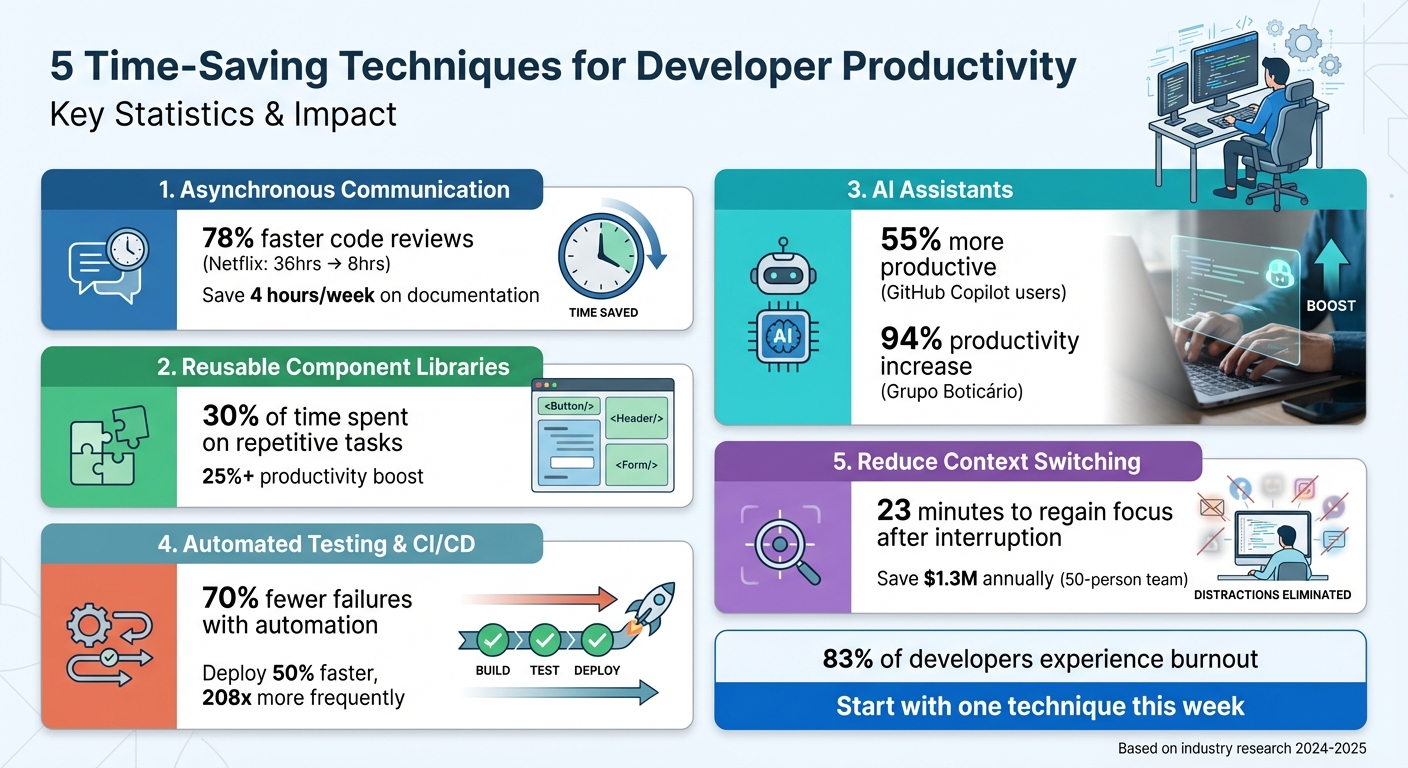
5 Time-Saving Techniques for Developer Productivity: Key Statistics and Benefits
10 things I learnt in 2024 to increase my developer productivity.
1. Use Asynchronous Communication to Stay Focused
On average, developers manage just 2–3 hours of uninterrupted coding time each day. The rest of their schedule often gets eaten up by standup meetings, Slack messages, and waiting for pull request approvals. Constant notifications and impromptu video calls can break focus, making it tough to solve complex problems that demand deep concentration.
Protecting Your Focus and Workflow
Asynchronous communication helps maintain focus by removing the pressure to respond immediately. Instead of letting notifications disrupt your flow, turn them off during your most productive coding hours. Save tasks like replying to messages for times when your energy is lower, leaving those high-energy morning hours for deep, focused work. This approach not only protects your concentration but also minimizes the impact of constant interruptions on your workflow.
Cutting Down Repetitive Tasks
Keeping documentation updated in platforms like Notion or Confluence can eliminate the need to answer the same questions repeatedly. For instance, when onboarding materials are well-maintained, new team members can find the information they need without having to ask for it. A great example is GitLab, which achieved a 95% compliance rate with standardized ADRs (Architecture Decision Records). This saved developers an impressive 4 hours per week on average. By streamlining communication, teams can focus more on coding and less on answering repetitive queries.
Scaling Across Teams and Time Zones
Asynchronous tools create a searchable record of decisions, making them ideal for teams spread across different time zones. Netflix, for example, cut their average code review time from 36 hours to just 8 hours – a 78% improvement – by adopting async workflows and automated reminders for pull requests. Whether you’re working alone or managing a distributed team, prioritizing asynchronous communication for non-urgent updates helps everyone stay focused on what truly matters: writing great code. These strategies are a smart way to minimize distractions and maximize productive coding hours.
2. Create Reusable Component Libraries and Templates
In addition to asynchronous communication, leveraging reusable code components can significantly streamline a developer’s workflow.
Reduces Repetitive Tasks
Did you know developers spend up to 30% of their time on routine tasks? This kind of repetitive work can lead to burnout. Think about it – building authentication flows, date formatters, or UI components from scratch for every project eats up valuable hours. Instead, pre-built libraries like Stack Auth and Proto.io offer ready-made solutions, saving time and effort. Tools for snippet management can also help by instantly surfacing relevant code when you need it most.
Improves Productivity
Reusable components are a game-changer for staying focused. When you’re not constantly rebuilding logic you’ve already written, you can channel your energy into tackling new challenges. By cutting down on context switching, these components help developers stay in the zone and boost productivity by over 25%. Pairing this with automated communication creates an environment where deep, uninterrupted work becomes the norm.
Enhances Focus and Workflow
"Documentation-driven development… write the documentation for how your feature or function or API will work [before coding]. Clarity emerges immediately." – TheBitForge, Developer and Technical Writer
Starting with documentation before diving into code helps clarify your design and identify potential edge cases early. Keeping a centralized library of reusable code snippets – like a utils.js file for common tasks – lets you quickly grab what you need without breaking your concentration. Tools like Prettier or Bracket Pair Colorizer can further streamline your workflow by automating code formatting, so you can focus on logic instead of syntax.
Scales for Teams and Individuals
Reusable libraries aren’t just for teams – they work just as well for solo developers. Tools like Pieces let individual developers save snippets across projects, creating a personal library of useful code. For teams, AI-powered tools like Tabnine ensure consistency across contributors. Internal Developer Portals, such as Port, centralize microservices and workflows, making it easy for team members to access the infrastructure they need. Platforms like Swimm even provide living documentation that updates automatically as your codebase evolves. Swimm offers a free plan for up to five users, with team plans starting at $17.78 per seat per month. Whether you’re working alone or with a distributed team, these tools make scaling efficient and seamless.
3. Speed Up Development with AI Assistants
AI coding assistants are changing the way developers handle repetitive tasks. Instead of spending time writing boilerplate code, standard functions, or unit tests from scratch, tools like GitHub Copilot and Zencoder automate these processes. This is a big deal because developers typically only get 2-3 hours of actual coding time per day, thanks to meetings and administrative work. By letting AI handle the routine stuff, developers can focus those precious hours on solving complex problems that require human creativity and judgment. This shift not only eliminates tedious work but also drives noticeable productivity improvements.
Reduces Repetitive Tasks
One of the standout strengths of AI assistants is their ability to take over the more monotonous aspects of coding – tasks like writing documentation, generating unit tests, or adding code comments. For instance, GitHub Copilot can automatically generate these based on your function signatures or natural language instructions. It even offers security-focused features like Copilot Autofix, which scans your code for vulnerabilities (e.g., insecure hashing algorithms) and suggests fixes on the spot. This automation ensures critical tasks are completed without eating into your prime focus time.
Improves Productivity
The numbers speak for themselves: developers using GitHub Copilot report being up to 55% more productive, with 75% saying it boosts their job satisfaction. In 2024, Grupo Boticário, a Brazilian cosmetics company, rolled out GitHub Copilot across its engineering teams and saw a 94% productivity increase. By automating mundane tasks like boilerplate code and documentation, their developers could dedicate more time to solving real problems, making their work both faster and more rewarding.
Enhances Focus and Workflow
These tools don’t just improve output – they also streamline your workflow.
"Code reviews are more efficient when you spend less time on minor implementation details, such as naming and style conventions, and instead focus your effort on higher level design, problem solving, and functionality that meets user needs." – GitHub
AI-powered code reviews go beyond catching typos – they flag style violations, performance issues like N+1 queries, and even security vulnerabilities. You can customize these tools to align with your team’s standards, such as enforcing PEP 8 style guides for Python or specific error-handling patterns. This tailored approach means the AI doesn’t just spit out generic suggestions; it provides solutions that fit seamlessly into your workflow.
Scales for Teams and Individuals
Whether you’re a solo developer or part of a larger team, AI assistants can adapt to your needs. GitHub Copilot offers several pricing tiers: a free version, Pro at $10/month, Business at $19/user/month, and Enterprise at $39/user/month. Tools like Zencoder take it a step further with features like "Repo Grokking™", which analyzes your entire codebase to provide suggestions based on your internal architecture rather than relying solely on public data. Start by applying AI to low-risk tasks, then gradually expand its role to more complex ones. Training your team on effective prompting techniques ensures consistent, high-quality results across the board. By integrating AI tools thoughtfully, you can maximize your team’s coding time and help prevent burnout.
sbb-itb-7c1dd7e
4. Automate Testing and CI/CD Pipelines
Manual testing and deployment can eat up hours that could be better spent on actual coding. Automated testing and CI/CD (Continuous Integration/Continuous Deployment) pipelines solve this issue by running tests and deploying code with minimal human involvement. The results speak for themselves: organizations that fully adopt CI/CD report 20% higher developer productivity and deploy code 50% faster. Teams that automate pipelines also experience 70% fewer failures compared to those relying on manual processes. By automating these workflows, you not only speed up deployment but also free your team from repetitive tasks.
Reduces Repetitive Tasks
Automation eliminates the mundane steps that slow you down – setting up environments, running regression tests, or deploying to staging servers. Instead of following a checklist, a single command can handle it all. For example, a U.S.-based FinTech startup used Playwright for UI automation and Jenkins for orchestration, cutting their regression testing time from 8 hours to just 45 minutes. This gave their developers entire afternoons back to focus on creating new features rather than babysitting tests.
"Before BrowserStack, it took eight test engineers a whole day to test. Now it takes an hour. We can release daily if we wanted to." – Martin Schneider, Delivery Manager
The trick is to start with the tasks that have the biggest impact. Automate high-frequency tests like smoke tests and regression suites that run with every commit. Use Docker to create consistent test environments that mirror production, solving the "it works on my machine" issue. Cache dependencies using hash keys tied to lock files like package-lock.json to avoid downloading the same packages for every build. These small changes add up quickly – especially since developers spend over 30% of their time on routine tasks that could easily be automated.
Improves Productivity
Fast feedback loops are another major benefit of automation. When your pipeline runs tests immediately after a commit and flags issues within minutes, developers can fix bugs while the code is still fresh in their minds. This is far better than discovering issues late in the game – or worse, just before a critical release. Teams with strong CI/CD practices deploy 208 times more frequently and have lead times that are 106 times faster than those relying on manual releases.
"Engineers are typically the most expensive people in a company and making them wait for builds to finish or forcing them to manually fix flaky tests is a major productivity killer." – Mary Moore-Simmons, VP of Engineering, Keebo
A global e-commerce platform used Cypress and Appium with CircleCI, containerizing their test environments to ensure consistency. The result? They reduced release cycles by 40% and caught critical bugs before they reached production. Automation didn’t just speed up their process – it transformed how their team worked, allowing them to deliver features faster without compromising quality.
Enhances Focus and Workflow
Long pipeline runtimes can disrupt an engineer’s workflow, forcing them to switch tasks and lose focus. Research shows that every interruption costs 23 minutes to fully regain momentum. Automated pipelines with parallel test execution – running test suites across multiple machines simultaneously – can drastically cut execution times and keep developers in the zone. For instance, a retail SaaS provider in Israel implemented parallel testing across browsers using CloudQA and Selenium Grid within their GitLab CI pipelines. This led to 10x faster user onboarding while maintaining 98% test coverage.
Automation also standardizes workflows. Code merging, testing, and deployment follow the same steps every time, reducing the chances of human error. Deployment strategies like blue-green or canary releases add an extra layer of safety by automatically rolling back to a stable version if health checks fail. With a reliable pipeline in place, developers can push changes confidently, knowing issues will be caught before they reach users. This streamlined process helps teams maintain the focus needed for innovation.
Scales for Teams and Individuals
Whether you’re a solo developer or part of a large team, automation tools can scale to meet your needs. For smaller setups, GitHub Actions integrates seamlessly with repositories and provides real-time validation with minimal setup. Mid-sized teams often turn to GitLab CI or CircleCI for more robust pipelines, while larger enterprises rely on Jenkins for its flexibility in complex environments. At scale, Infrastructure as Code (IaC) tools like Terraform and Ansible become essential for automating server setups and cloud resource provisioning.
To get started, focus on automating unit tests that run automatically on code pushes to catch bugs early. Track your team’s workflow for two weeks to identify the most repetitive, time-consuming tasks – like manual deployments or environment setups – and tackle those first. Use a simple formula to justify automation to leadership: ROI = (Time Saved per Task × Task Frequency) - Implementation Time. By 2025, Gartner predicts that 70% of organizations will have implemented structured automation, a huge leap from just 20% in 2021. Teams that act now will gain a clear edge over competitors.
5. Reduce Context Switching and Distractions
Switching between tasks is one of the biggest productivity killers. Every time you jump from coding to Slack, then to email, and back to your IDE, you create a chain of mental disruptions that can be hard to recover from. Research shows it takes an average of 23 minutes to fully regain focus after just one interruption. When task switching happens frequently – about 13 times per hour – it becomes nearly impossible to reach the deep work state needed for solving complex problems.
Enhances Focus and Workflow
Protecting your focus isn’t just about feeling productive; it directly improves the quality and speed of your work. Developers who carve out uninterrupted work blocks can better estimate timelines and work in sync with their natural energy levels. The trick is to prevent interruptions before they happen. For example, use tools like Zen Mode in your IDE and set Slack to "Do Not Disturb" during deep work sessions. Another useful tactic is the Two-Terminal Rule: keep one terminal for running servers and tests, and another for checking logs. This helps avoid losing your command history or mental flow when debugging.
Instead of relying on short bursts like 25-minute Pomodoro timers, aim for 90–120 minute blocks of focused work during your peak energy hours. For tasks you’re procrastinating on, try the 15-Minute Rule: commit to just 15 minutes to get started and break the inertia. Similarly, if you’re tempted by distractions, set a 15-minute timer to see if exploring them actually solves the issue at hand.
"We spend years learning to code, but almost no time learning to work. We optimize our algorithms but not our days." – TheBitForge
Improves Productivity
Cutting down on context switching doesn’t just protect your focus – it leads to measurable productivity gains. For example, a team of 50 losing 5 hours per week to delays could see costs soar to $1.3 million annually. Between 2021 and 2023, Etsy invested 20% of its engineering capacity over 18 months to reduce developer friction. The result? They saved 50% of the time previously spent waiting for deployments, which equated to the equivalent of a quarter of a full-time engineer’s annual salary per team member. Similarly, Block (Square/CashApp) streamlined their tools and workflows, saving millions of dollars within a year while also boosting developer satisfaction scores.
Automation is another game-changer. Teams using Generative AI tools to handle repetitive tasks complete software projects 21% faster. Additionally, companies that use structured productivity insights report up to a 30% drop in customer-reported defects. Take Empego, a pharmacy SaaS company with $1M in ARR and a small team of 15. By adopting the Chrono Platform in 2025, they automated resource allocation, saving $456,000 in salary costs and achieving a 108% annualized ROI, while reducing tax credit reporting time from weeks to just hours.
Scales for Teams and Individuals
Whether you’re working solo or as part of a large team, focus-protection strategies can scale effectively. Just like automation and reusable code libraries, creating a distraction-free workflow is key to maintaining sustainable productivity. Here are a few practical tips:
- Batch small tasks: Dedicate specific time blocks for handling PR reviews, email, and admin work to avoid constant interruptions.
- Use the 2-Minute Rule for PRs: If a code review takes less than two minutes, handle it immediately to keep others moving. For longer reviews, schedule them during a dedicated block.
- Streamline with terminal aliases: Set up shortcuts like
gsforgit statusto save time and reduce decision fatigue. - Standardize team tools: Share IDE configurations and extension lists. A well-tuned IDE can save each developer 15–30 minutes daily by cutting down on navigation friction.
Conclusion
These five strategies can reshape your workday. By adopting asynchronous communication, creating reusable component libraries, utilizing AI assistants, automating testing and CI/CD pipelines, and reducing context switching, you can achieve consistent productivity without the risk of burnout. With 83% of developers experiencing burnout, these methods address key workflow challenges head-on.
What’s great is that these strategies work for both individual developers and large teams. This adaptability not only saves time but also enhances team morale. Start small – AI assistants can immediately ease your workload, with 75% of users reporting greater job satisfaction. From there, focus on broader changes, like shared component libraries, which can slash development time by as much as 50%. As Paul Bratslavsky, Developer Advocate at Strapi, aptly explains:
"Developer productivity requires workflow optimization, not time management – focus on reducing cognitive overload and context switching that fragments deep work sessions".
These approaches also help conserve mental energy, reduce last-minute fixes, and establish a steady rhythm in your work. When you’re not losing 23 minutes recovering from every interruption, you gain more time for creative problem-solving – and for life outside of work.
Take a moment to evaluate your current workflow. Choose one strategy from this article and put it into practice this week. If constant notifications are your challenge, try the Two-Terminal Rule. If you find yourself rewriting the same code patterns, focus on building reusable components. If manual testing slows you down, automate it. As Jeetpal Singh, a Full-Stack Developer, wisely points out:
"Becoming a more productive developer doesn’t happen overnight. It’s a continuous journey that requires effort, adaptability, and a willingness to learn".
Your time is limited, but your potential impact isn’t. Prioritize smarter working habits, protect your focus, and build systems that empower you to excel – without compromising your well-being.
FAQs
How does asynchronous communication help developers stay focused?
Asynchronous communication allows developers to stay focused by cutting down on interruptions and eliminating the pressure to respond instantly. Instead of being bombarded with constant notifications or engaging in real-time conversations, team members can post updates or questions that others can address at a suitable time.
This method helps avoid frequent context switching, enabling developers to remain in a deep work state – perfect for tackling complex coding challenges. With fewer distractions, productivity improves, code quality benefits, and stress levels are kept in check.
What are the advantages of using reusable component libraries in development?
Using reusable component libraries can make a developer’s life a lot easier. For starters, they save time by cutting out the need to write the same code over and over. Instead of starting from scratch, you can focus on creating new features and bringing fresh ideas to life.
Another big plus? Consistency. These libraries help standardize both design and functionality across your projects. This means your applications will look and work more uniformly, which can significantly boost their overall quality.
Maintenance also gets a lot simpler with reusable libraries. Since commonly used components are centralized, you can make updates or fix bugs in one spot, and those changes will automatically reflect wherever the components are used. This not only keeps things running smoothly but also promotes efficient, scalable development practices.
How can AI assistants help developers save time and boost productivity?
AI assistants are game-changers for developers, streamlining workflows and boosting productivity by taking over time-consuming tasks like code formatting, error spotting, and creating documentation. With features like real-time code suggestions, they help developers write cleaner, more efficient code while staying focused on tackling complex challenges.
Another big advantage? They cut down on context switching by blending smoothly into development environments. This integration keeps distractions to a minimum and workflows running smoothly. By managing routine tasks, AI tools let developers devote their energy to innovation and more impactful work.