Flexible work schedules are now a priority for many businesses, with over 40% of companies adopting hybrid models by 2026. While this flexibility attracts top talent and expands hiring opportunities, it also introduces challenges like time zone coordination, scheduling conflicts, and maintaining productivity. The right tools can help solve these issues by automating tasks, improving communication, and reducing stress.
Here’s a quick breakdown of the best tools for managing flexible work:
- Employee Scheduling Tools: Simplify shift management with platforms like Connecteam, ZoomShift, Zoho Shifts, and Shiftura. Features include drag-and-drop scheduling, mobile apps, and self-service shift swaps.
- Work Management Platforms: Coordinate projects effectively using tools like Asana, monday.com, and Wrike. Key features include customizable workflows, automation, and AI-powered insights.
- Hybrid Workplace Solutions: Manage office resources with tools like WorkInSync, DeskFlex, and Skedda. These platforms offer desk booking, real-time availability, and space utilization analytics.
- Time Tracking Tools: Track hours and costs with tools like Toggl Track, Clockify, and Hubstaff. They sync time records with payroll and help monitor project budgets.
Quick Comparison
| Tool Type | Key Features | Top Choices |
|---|---|---|
| Employee Scheduling | Shift swaps, mobile apps, GPS tagging | Connecteam, ZoomShift |
| Work Management | AI automation, project views, integrations | Asana, monday.com, Wrike |
| Hybrid Workplace | Desk booking, analytics, visitor tracking | WorkInSync, DeskFlex, Skedda |
| Time Tracking | Budget alerts, payroll sync, GPS tracking | Toggl Track, Clockify, Hubstaff |
These tools are designed to address specific challenges of flexible work, helping businesses stay organized and productive while supporting employee well-being.
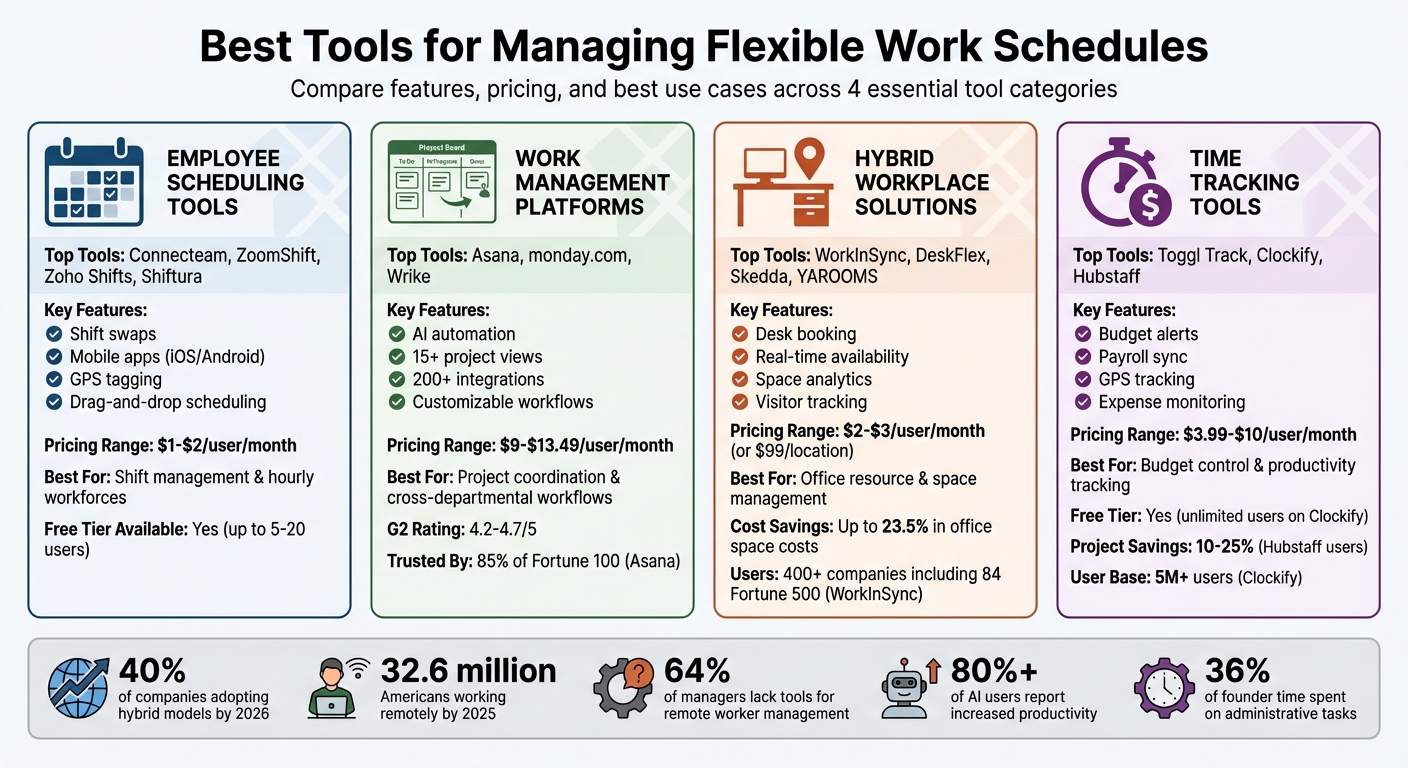
Comparison of Best Tools for Managing Flexible Work Schedules by Category
The 7 Best Low-Cost Employee Scheduling Apps for Small Businesses
sbb-itb-7c1dd7e
Employee Scheduling Tools for Shift Management
Employee scheduling tools simplify the process of assigning shifts, handling time-off requests, and allowing employees to coordinate schedules – all through a single dashboard. These tools not only make shift management more efficient but also lay the groundwork for integrating broader work coordination systems.
Main Features of Employee Scheduling Tools
The best scheduling tools come packed with features that make managing shifts easier. Tools with drag-and-drop editing and pre-set templates enable quick schedule creation or duplication. Auto-scheduling functions use AI to assign shifts based on employee availability, certifications, and company policies, while also flagging potential issues like double-bookings or overtime conflicts.
A standout feature is self-service shift swapping, which allows employees to find replacements on their own. Managers can approve or deny these swaps with just a tap. Platforms like Shiftura and ZoomShift excel in this area, streamlining shift swaps for teams.
Mobile access is another must-have for today’s flexible workplaces. Most modern tools offer dedicated apps for iOS and Android, complete with automatic shift reminders sent via text, push notifications, or email. For instance, Zoho Shifts includes GPS tagging and geofencing, ensuring remote or hybrid employees clock in from the correct location.
Employee Scheduling Tools to Consider
Connecteam: This platform goes beyond basic scheduling by offering features like task checklists and file attachments, ensuring remote employees have everything they need. It integrates seamlessly with payroll tools like Gusto and Zapier, reducing administrative tasks. Companies like Biggby Coffee report that 98% of their employees actively use Connecteam daily, while NAE Cleaning Solutions saw a tenfold ROI after consolidating operations onto the platform.
ZoomShift: Designed with accountability and cost control in mind, ZoomShift helps reduce no-shows with automatic reminders and offers labor forecasting to keep staffing budgets on track. Trusted by over 20,000 businesses, it’s a reliable choice for managing hourly workforces.
Zoho Shifts: Perfect for tech-savvy entrepreneurs, Zoho Shifts includes features like GPS tagging and geofencing to verify remote check-ins. It also offers flexible reporting tools and a built-in support chat for quick assistance.
Shiftura: This platform’s fairness tracking feature ensures equitable scheduling by monitoring the distribution of hours, weekends, and night shifts. By promoting fairness, it helps maintain team morale and reduce scheduling conflicts.
Employee Scheduling Tools Comparison
| Feature | Connecteam | ZoomShift | Zoho Shifts | Shiftura |
|---|---|---|---|---|
| Best For | All-in-one management | Accountability & Cost Control | Remote site verification | Self-serve shift swaps |
| Free Tier | Up to 10 users | Up to 20 users | 30-day trial only | Up to 5 users |
| Mobile App | Yes (iOS/Android) | Yes (iOS/Android) | Yes (iOS/Android) | Mobile-friendly web |
| Key Tech Feature | Task checklists & API | GPS/IP Whitelisting | GPS tagging/Geofencing | Fairness tracking |
| Pricing (Paid Plans) | From $29/month (30 users) | From $2/user/month | From $1/user/month (min. 10 users) | From $32.50/month (25 users) |
| Communication | In-app chat & Directory | Group & Private messaging | Built-in messenger | Email notifications |
Work Management Platforms for Project Coordination
Work management platforms go beyond basic scheduling to centralize tasks, deadlines, and team collaboration in one place. By replacing scattered emails and spreadsheets with a unified workspace, these tools create a streamlined approach to managing projects effectively. Here’s a closer look at their key features and popular options.
Main Features of Work Management Platforms
These platforms are designed to adapt to various business needs while simplifying project coordination. Features to look for include:
- Customizable Workflows: Many tools offer drag-and-drop interfaces and multiple project views, such as Gantt charts, Kanban boards, and calendar layouts, to help manage deadlines more efficiently.
- No-Code Automation: Set up "if-then" rules without needing IT expertise. For instance, when a task is marked "Done", the system can notify the next team member and update boards across departments automatically.
- AI-Powered Tools: AI features are becoming standard. Wrike, for example, uses AI to predict project risks, saving teams up to 10 hours per week. Similarly, monday.com incorporates AI for generating content, analyzing comment sentiment, and summarizing long task threads, making it easier to stay updated after time away.
- Real-Time Dashboards and Mobile Apps: These features provide clear visibility into workloads and ensure timely updates, even on the go.
By offering these capabilities, work management platforms support the flexible work environments that many tech entrepreneurs rely on today.
Work Management Platforms to Consider
For teams with flexible schedules, these platforms help align daily tasks with broader business objectives.
Asana: Trusted by 85% of Fortune 100 companies, Asana excels at connecting individual tasks to company-wide goals. Its intuitive interface is perfect for teams transitioning from spreadsheets. Features include rule-based automation and AI teammates for insights. With integrations for over 200 tools like Slack, Google Workspace, and Jira, Asana fits seamlessly into existing workflows.
monday.com: A Leader in the 2025 Gartner® Magic Quadrant™ for Collaborative Work Management, monday.com is known for its adaptability. Non-technical users can build workflows using customizable building blocks, making it a flexible choice. Motorola reported a 346% ROI within just four months of implementation. The platform also offers over 15 project views and features like "Mirror Columns" to sync data across teams.
"monday.com has been a life-changer. It gives us transparency, accountability, and a centralized place to manage projects across the globe."
- Kendra Seier, Project Manager
Wrike: Tailored for complex IT and PMO structures, Wrike supports over 20,000 users with role-based access. It offers extensive customization and more than 400 integrations through Wrike Integrate. With tools like infinite whiteboards for brainstorming, it bridges creative planning and structured execution. However, implementing Wrike can take 3–6 months and may require consultant support.
Work Management Platforms Comparison
| Feature | Asana | monday.com | Wrike |
|---|---|---|---|
| Best For | Enterprise goal alignment | Flexible cross-departmental workflows | Complex IT/PMO structures |
| Implementation Time | 1–2 months (team-led) | 2–4 weeks (self-serve) | 3–6 months (consultant-heavy) |
| Customization Level | Low (fixed task structures) | High (no-code building blocks) | High (complex configuration) |
| Automation | Rule-based triggers & AI insights | AI blocks with cross-board logic | AI agents for risk prediction |
| Integrations | 200+ tools | 200+ native integrations | 400+ via Wrike Integrate |
| Primary Views | List and Board focus | 15+ views (Kanban, Workload, etc.) | Gantt chart and folder hierarchy |
| G2 Rating | 4.4/5 | 4.7/5 | 4.2/5 |
| Starting Price | $13.49/user/month | $9/user/month | $10/user/month |
These platforms cater to different needs, from straightforward task management to highly complex workflows, making it easier to find the right fit for your team.
Hybrid Workplace Solutions for Desk and Space Management
Just like scheduling and project coordination tools, hybrid workplace solutions help tackle the challenge of flexibility by making better use of available resources and time-saving tools. These tools simplify how teams manage desks and meeting rooms when splitting time between home and office. Plus, they provide useful data to help you make smarter decisions about your office space.
What to Look for in Hybrid Workplace Tools
The best hybrid workplace tools should cover desk booking and flexible seating through user-friendly mobile or web apps. These apps should show real-time workspace availability, making it easy for employees to find a spot. For meeting rooms, scheduling features are key – they prevent double bookings by showing live availability, often displayed on tablets or digital signs outside the rooms.
Analytics play a big role, too. Space utilization data can track occupancy patterns and peak usage, helping you identify areas that aren’t being fully used. This insight can lead to savings – up to 23.5% in office space costs – by guiding decisions about redesigning layouts or even downsizing real estate. Some platforms also offer interactive floor maps (in 3D or 2D) that help employees locate coworkers and available desks with ease.
Another must-have is an auto-release feature for unused bookings, ensuring spaces don’t sit idle unnecessarily. Advanced platforms often include visitor management systems to simplify guest check-ins while maintaining digital security logs. Some tools have even started offering sustainability tracking, such as carbon reporting, to monitor environmental impacts.
Here are a few hybrid workplace solutions that stand out.
Hybrid Workplace Tools to Consider
WorkInSync is trusted by over 400 companies, including 84 Fortune 500 brands, with pricing starting at $3 per user. It’s designed for distributed teams and includes features like parking, meal management, and attendance tracking. Its "neighborhoods" feature allows admins to assign specific zones for departments, ensuring team members can easily work together when they’re in the office.
"WorkInSync stands out as one of the best solutions available for office management. With modern workplaces implementing flexible work arrangements and staggered schedules, WorkInSync is a smart tool to streamline operations." – Chief Information Officer, Grupoexpro
DeskFlex caters to large enterprises and healthcare organizations, offering customizable 3D mapping and strong visitor security features. It integrates seamlessly with tools like Office 365, Outlook, Zapier, and Okta, making it a great fit for IT-heavy environments that need enterprise-level compliance.
For smaller teams, Skedda provides an affordable option with a free version for very small offices. Its self-service interface is simple to set up, making it a great choice for coworking spaces and small businesses that need basic desk and room booking without much hassle.
YAROOMS starts at just $2 per user and includes carbon reporting alongside standard desk and room management features. With over 1 million office bookings managed each month for global enterprises, it proves it can handle growth. Meanwhile, WOX offers a different pricing model – $99 per location with no per-user fees – which can be a cost-effective option for larger teams.
Time Tracking and Cost Management Tools
How Time Tracking Tools Help Flexible Schedules
Time tracking tools are a game-changer for tech entrepreneurs managing teams with varying schedules. These platforms sync attendance records with PTO requests, ensuring smooth operations without overlapping shifts or gaps in coverage. One standout feature is budget alerts. These notifications kick in when a project is nearing its time or cost limits, helping you avoid unapproved overtime before it becomes an issue.
The financial impact of these tools is hard to ignore. For instance, Hubstaff users report project savings of 10% to 25%. On top of that, automated time tracking can cut bookkeeping time drastically – from an entire week to just one or two days. By assigning specific hourly cost rates to employees or projects, you can track real-time labor expenses and compare them to billable rates, keeping a close eye on profitability.
"With tools like Hubstaff, you can tell… if a whole project should’ve taken 16 hours or if someone is just not the right fit." – Solomon Thimothy, President, OneIMS
Let’s take a closer look at some tools that bring these benefits to life.
Time Tracking Tools to Consider
Here are some top choices for time tracking tools, each offering unique advantages.
Toggl Track is known for its simplicity, offering a one-click timer and automated payroll tracking. It includes a free version ideal for small teams, while paid plans unlock features like advanced reporting and project auditing.
Clockify is a strong option for larger teams, especially those on a budget. Its free tier supports unlimited users and projects. With over 5 million users and a 4.8/5 rating from more than 9,000 reviews, it’s praised for features like shift scheduling, a time clock kiosk, and detailed expense tracking to monitor profitability. Bojan Cincur, founder of the SEO agency Zlurad, shared how Clockify helped streamline payroll processing, allowing his team to "run payroll at the speed of light" while focusing on high-priority tasks. Paid plans start at $3.99 per seat/month and include QuickBooks integration for seamless accounting.
Hubstaff takes a deeper dive into productivity metrics and workforce management. Features like GPS tracking and geofencing ensure attendance accuracy for remote or field-based teams. It’s compliant with GDPR, HIPAA, and SOC 2 Type II standards, making it a solid choice for handling sensitive data. Hubstaff boasts a 4.5/5 rating on G2 from 1,300 reviews and was named a Leader for Fall 2025. You can try it free for 14 days without needing a credit card.
| Feature | Toggl Track | Clockify | Hubstaff |
|---|---|---|---|
| Best For | Freelancers & Tech Teams | Large teams on a budget | Productivity & Field teams |
| Key Cost Control | Billable rates & Payroll | Project estimates & Expenses | Budget alerts & Limits |
| Scheduling | Basic tracking | Shift scheduling & Kiosk | Advanced shift & PTO sync |
| Integrations | 100+ tools | Various APIs | 35+ (Salesforce, Jira, Deel) |
What to Consider When Choosing Scheduling Tools
Finding the right scheduling tool is essential for tackling the coordination challenges that come with flexible work environments. The right choice can help you recover valuable time lost to administrative work. As productivity expert Francesco D’Alessio points out:
"Entrepreneurs have fundamentally different calendar needs… using basic tools means you’re either paying for 4 separate apps or manually doing work that should be automated"
Considering that founders spend about 36% of their week on administrative tasks, the right scheduling tool can make a big difference in reclaiming those hours.
Mobile Access and Real-Time Notifications
For many, a smartphone acts as a central hub for managing daily tasks. If a scheduling tool’s mobile app doesn’t measure up – whether it’s slow, missing features, or just hard to use – it can be a dealbreaker. D’Alessio sums it up well:
"Entrepreneurs live on their phones. If the mobile version is clunky, missing features, or slower than the desktop app, that’s a dealbreaker"
For industries like retail, construction, or logistics, mobile access is even more critical. It allows team members to check schedules, swap shifts, and clock in using GPS functionality. Real-time notifications via SMS, push alerts, or email ensure everyone stays updated, especially during last-minute changes. Even wearable devices like the Apple Watch can help by letting you check your schedule discreetly during meetings.
Before committing to a tool, thoroughly test its mobile version. Many entrepreneurs check their calendars over 20 times a day on their phones. A smooth mobile experience is essential and sets the stage for better integration with your existing systems.
Integration with Existing Systems
A scheduling tool that doesn’t play well with your current tech stack can create more problems than it solves. Look for a tool that syncs effortlessly with major calendars like Google Calendar, Outlook, and Apple Calendar to avoid double-booking. The best tools also integrate with task management platforms like Asana, Todoist, Notion, or Jira, allowing you to drag tasks directly onto your calendar for time-blocking.
Communication platforms such as Slack and Microsoft Teams can be synced to update your status or notify you of new bookings. For sales teams, CRM tools like Salesforce or HubSpot can automatically log calls and meetings. And don’t overlook features like automatic video conferencing link generation for Zoom, Google Meet, or Microsoft Teams, which save time by eliminating the need to manually share meeting details.
As D’Alessio explains:
"The ROI calculation is simple: if the app saves you 5 hours per month and you value your time at $100/hour, a $30/month app is a steal"
The more integrated your scheduling tool is with your workflow, the more time and effort it can save.
Scalability and Customization
Your scheduling needs will evolve as your business grows, so it’s important to choose a tool that can grow with you. Look for features like customizable views – daily, weekly, or monthly – and dashboards that can handle increasing complexity. The tool should be able to transition seamlessly from individual use to team-wide coordination without requiring an overhaul.
Features like natural language input and keyboard shortcuts make event creation faster as your schedule becomes more crowded. Tools powered by AI, such as Motion and Reclaim, can automatically adjust your calendar to resolve conflicts and protect dedicated focus time. With time-blocking shown to boost productivity by up to 25%, these features can be game-changers.
For teams spread across multiple time zones, automatic adjustments ensure meetings are scheduled at appropriate times for everyone. Scalability and flexibility are key to ensuring your scheduling tool remains effective as your needs expand.
Conclusion
The right scheduling tools can completely change the game when it comes to managing flexible work. These tools help you reclaim time that would otherwise be lost to endless coordination, freeing you up to focus on growing your business while maintaining a healthy work-life balance. With 32.6 million Americans projected to work remotely by 2025, having an effective tech stack isn’t just helpful – it’s a necessity.
But remember, as Kirsti Lang from Buffer wisely points out:
"Productivity tools aren’t one-size-fits-all"
Your needs might range from employee scheduling software for shift workers to project management platforms for distributed teams, or even AI-powered time trackers to optimize your calendar. The key is to find tools that fit seamlessly into your workflow and address your specific challenges.
Start by identifying your biggest hurdle. Is it coordinating across time zones? Tracking billable hours? Managing desk bookings for a hybrid setup? Once you’ve pinpointed the problem, look for tools that integrate smoothly with your current systems. As Lark aptly notes:
"Fragmentation is the enemy of time"
Switching between disconnected apps only creates more work, not less.
Once you’ve identified your challenges, take the time to evaluate and test potential solutions. Free trials can be incredibly helpful here – after all, over 80% of AI users report increased productivity. As Ben Brigden from Teamwork.com puts it:
"When you land on the right one, it’s like trading in a messy junk drawer for a perfectly labeled toolbox"
The goal is to streamline your processes, not complicate them further.
Whether you’re tackling employee scheduling, project coordination, hybrid office management, or time tracking, the right tools can give you a real competitive edge. With 64% of managers admitting they lack the tools to effectively manage remote workers, making the right choice is critical. Look for solutions that reduce stress, protect focus time, and grow alongside your business.
FAQs
Which tool type do I need first?
Start with a project management or task organization tool to lay the groundwork for your workflow. These tools are essential for structuring tasks, tracking progress, and keeping everything organized – especially when working with flexible schedules. Platforms like Asana or Kanban Zone allow you to sort tasks, set deadlines, and keep everything clear and manageable before incorporating additional productivity tools.
How do I prevent time zone scheduling conflicts?
Using scheduling tools that automatically adjust for time zones can save a lot of headaches. Options like Calendly, Recurrr, NomadTime, or AI-driven tools such as Reclaim.ai and Clockwise do the heavy lifting for you. These tools not only convert meeting times into each participant’s local time but also include features like real-time availability checks and seamless calendar integrations. This makes it easier to avoid scheduling mishaps and keeps everyone on the same page, no matter where they are.
What integrations should I prioritize?
Integrating the right tools can make managing flexible work schedules much smoother. For project management and communication, platforms like Slack are great for keeping teams connected and aligned.
When it comes to organizing tasks and schedules, tools such as Notion offer versatile workspaces that combine calendars, task lists, and notes in one place. For file sharing and storage, Dropbox provides a reliable option to ensure everyone has access to the latest versions of important documents.
And for creative collaboration, Canva simplifies design work, making it easy for teams to create and share visual content. These tools not only streamline workflows but also help improve team collaboration, ensuring everything stays on track – even with flexible schedules.